
Welcome to Lancaster H.O.G. Chapter #5254
More Than a Ride — It's a Brotherhood, a Friendship, and a Way of Life.
Welcome to Lancaster Harley Owners Group (H.O.G.) Chapter #5254, proudly sponsored by Lancaster Harley-Davidson in Lancaster, Pennsylvania.
Our chapter brings together Harley-Davidson enthusiasts who share a passion for the open road, the freedom of riding, and the friendships that make every journey memorable.
Whether you're an experienced rider or new to the Harley-Davidson family, Lancaster H.O.G. offers an opportunity to meet fellow enthusiasts, explore new destinations, and enjoy the camaraderie that makes motorcycling so special.
The Ride Is Just the Beginning
Throughout the year, our chapter brings members together for scenic group rides, dinner rides, weekend adventures, our Keystone Challenge, and other organized activities. Our Road Captains help make these experiences enjoyable while emphasizing safe, responsible motorcycling.
But Lancaster H.O.G. is about more than the miles we travel. We also enjoy chapter meetings, social gatherings, special celebrations, and opportunities to build friendships that extend well beyond the motorcycle.
A Chapter Where Everyone Belongs
We believe the best part of owning a Harley-Davidson is sharing the experience with others. Whether you're joining us for your first chapter ride or have been riding for decades, you'll find people who share your enthusiasm for motorcycles and adventure.
We invite you to explore our website, meet our chapter officers, check our upcoming events, and discover everything Lancaster H.O.G. Chapter #5254 has to offer.
Come for the Ride. Stay for the Friendships.
This section is a placeholder for future chapter resources. No documents, reports, or password system are connected yet.
Membership Directory
Membership records are protected. This review does not load the roster until database policies and authenticated queries have been verified.
| Last Name | First Name | Officer Role | Member Since |
|---|
Directory loads from Supabase after login when the accompanying SQL policy is installed. Existing 225 member records must be migrated separately; they are not embedded in this review.
Explore the 2026 Keystone Challenge locations. Drag the map to move around; use the buttons or mouse wheel to zoom. The location legend is shown alongside the map.
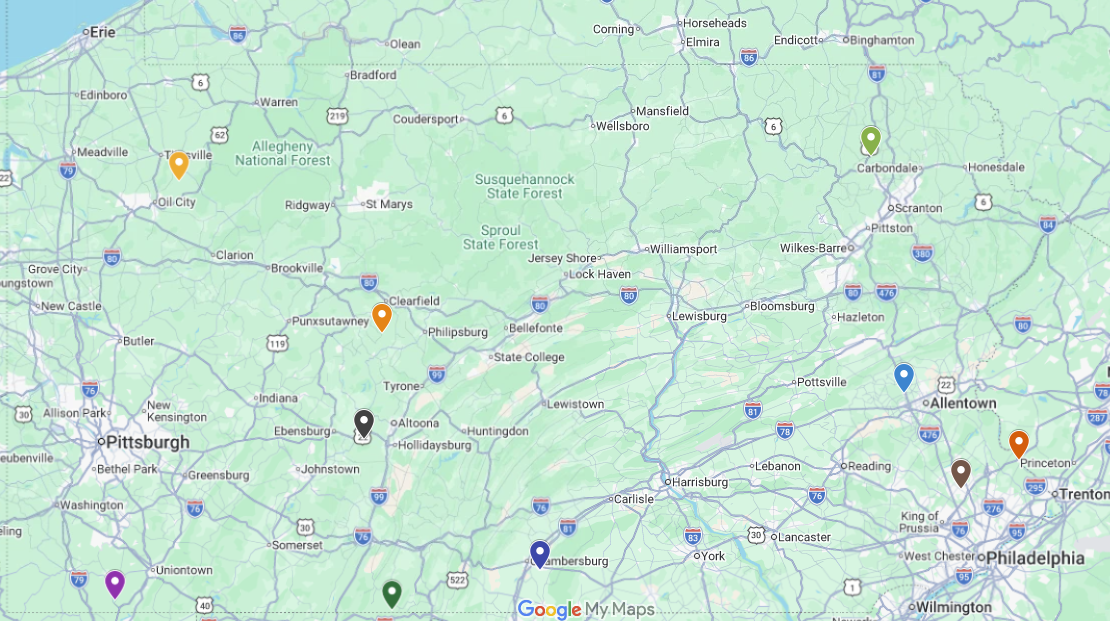
This is an interactive, zoomable version of the supplied map image, not a live Google map. To open individual location pins or get driving directions, we would need the original Google My Maps sharing link.

Countdown to January 1, 2027
Happy New Year! The 2027 Keystone Challenge has arrived.
Will Sheila give us one early?
Keystone Challenge information for this year will be added here.
Chapter Events Calendar
Official Lancaster H.O.G. Chapter #5254 event schedule. Select an event for details or use the calendar controls to change views.
If the calendar does not appear, open the chapter calendar in Google Calendar. The calendar must be publicly viewable for visitors to see it here.
Upcoming Rides & Events
Upcoming chapter rides and activities posted through the Admin page.
Chapter Announcements
Chapter news, notices, and updates.
Meet Our Chapter Leadership
Meet the people who help make every ride, gathering, and chapter experience special.
Lancaster Harley-Davidson / Sponsoring Dealer
Primary Officers
Secondary Positions
Road Captains
Lancaster Harley-Davidson
308 Beaver Valley Pike
Willow Street, PA 17584
Officer photos can be added later. The Admin photo manager is a browser-local demonstration; it does not publish changes to all visitors.
Officer Administration — Demonstration
This interactive area shows how officers might manage the chapter. News posts and rides/events added below appear immediately in the two News columns and are saved in this browser only. They are not published to other visitors. Other demonstration tools may have different storage behavior.
Administrator Sign-In — Start Here
Account: brkette1@gmail.com (Lancaster H.O.G. website administrator, not your Vercel or Supabase Dashboard login).
Step 1: Publish the reviewed website to your existing Vercel project. Step 2: Verify that the password callback page opens on your live site. Step 3: Confirm the callback is allowed under Supabase Authentication → URL Configuration. Step 4: In Supabase Authentication → Users, select the existing administrator account and choose Send password recovery. Step 5: Follow the email link and set a new password, then sign in here.
Important: The recovery email must actually land on the password setup page. Supabase Dashboard recovery emails may use the configured Site URL, so inspect the resulting destination during a controlled test; do not assume the redirect is correct.
These checks cannot deploy the website or create a password. No member invitations are sent. The login screen can request a reset email only on the live production domain.
Administrator Launch Status — Review
This section separates completed preparation from features that still require live testing. It does not make changes to member accounts.
- Roster: 225 members imported to private Supabase staging.
- Member editor: review interface prepared; editing policies and live save need verification.
- Account recovery: password page prepared; live callback and administrator login unverified.
- Invitation approval: backend review code prepared; SQL, concurrency and authorization need testing.
- Invitation sending: disabled; no accounts or emails are created by this review.
For security, do not send chapter invitations until login, roles, database policies and first-time password setup have been tested.
Website Account Approvals — Supabase
Approve website login accounts that already have a pending member profile. Approval grants Members access only; it does not send an invitation or change an officer role. Verify the member's identity and current chapter membership before approving.
Click Refresh pending accounts to load requests.
| Name | Account email | Status | Action |
|---|
Only accounts with a record in member_profiles appear here. Invited users without a profile must be enrolled through a separate secure onboarding process. This page does not automatically create profiles or verify roster eligibility.
Member Management — Supabase
Administrators can review and edit chapter roster records here after the accompanying database policy has been installed. Use the email status filter to work through missing and unverified addresses. Changes are saved to Supabase, not this browser. Editing a chapter position does not change website access permissions.
Email review totals appear after administrator sign-in.
Sign in as an administrator to load the roster.
| Member | Review | Action |
|---|
Administrator Setup — One-Page Overview
Where things stand: Your 225-member roster is already imported. The editing and invitation screens are review features. Website password setup, database permissions, and invitation delivery have not been verified on the live site.
Next milestone: Verify the administrator login and password-recovery link, review the database permissions, then run a single test invitation with a second administrator. Only after those checks should member invitations be enabled.
You do not need to change GitHub, Vercel, or Supabase just to review this page. No invitations are sent by opening the preview.
Website Account Launch — Safety Checklist
This is a review of what must work before any chapter member receives an invitation. No invitations are enabled in this build.
- Administrator can sign in and reset their password on the deployed website.
- Member's email is confirmed, unique, and not already linked to a login.
- A second active administrator approves the request.
- Private audit database and role permissions are verified.
- One test invitation completes the first-password setup successfully.
Current status: Not ready for live invitations. The review checks cannot replace live security testing.
Member Invitations & Website Accounts — Planning Preview
Not connected: This is a safe review of the proposed administrator workflow. It cannot create accounts, assign permissions, or send invitations until a protected server-side service is deployed and tested.
Before an invitation: verify the email belongs to this member, resolve shared addresses, confirm active membership, and check that an account does not already exist. Administrator roles and Treasurer access require a separate authorized approval. Never place a Supabase service-role key in this website.
No invitations have been sent.
Proposed account lifecycle
- Validate verified, unique email and active roster membership.
- Authorized administrator approves the invitation and access level.
- Secure server creates or matches the Supabase Auth account without exposing secrets.
- Member receives a time-limited password setup link.
- Member sets password; server records invitation outcome and audit trail.
- Role changes, deactivation, and re-invitations are separately audited.
Invitation Tracking — Review
This is the proposed audit history for account invitations. Invitation delivery is not enabled. Only an authenticated administrator will be able to request the private server-side history after deployment and approval.
No invitation history loaded. No invitations have been sent by this review build.
| Date | Event | Outcome |
|---|
Officer & Road Captain Manager
Upload a photo for each person and arrange the display order using the arrow buttons or drag and drop. Changes appear immediately on the Officers page in this browser.
Publishing note: This static website saves photo/order changes only in this browser. Use Export configuration to save a backup; a future secure admin service will be needed to publish changes for every visitor.
Chapter leadership
Road Captains
Calendar Management — Add Chapter Event
Prepare an event here, then review and save it in Google Calendar. Events saved to Lancaster H.O.G. Chapter #5254 Events will appear on the website calendar.
All times are Eastern Time (America/New_York). Do not put private member information in events on a publicly shared calendar. Event editing and deletion remain available through Google Calendar.
News posting preview: Use the event and announcement forms below to populate the News page. Entries are saved only on this device/browser. Publishing to all website visitors will require a secure shared backend. The separate Google Calendar form above still opens Google Calendar and does not automatically create a News card.
Post Upcoming Ride or Event
Post a sample announcement
Homepage Background — Seasonal Settings
Choose a seasonal background or upload a picture. Changes appear on the Home page only.
This is a local demonstration: the background is saved only in this browser on this device. It will NOT update the website for other visitors or officers. Publishing site-wide changes requires a connected backend and authenticated admin access.
Excel migration planning
Future import process: select spreadsheet → map column headings → validate and deduplicate → review changes → authorized officer confirms import. No real spreadsheet upload or import is enabled in this prototype.
The template includes basic chapter fields. Sensitive columns should be optional and access-restricted in production.